Open Source CLI
Santra CLI
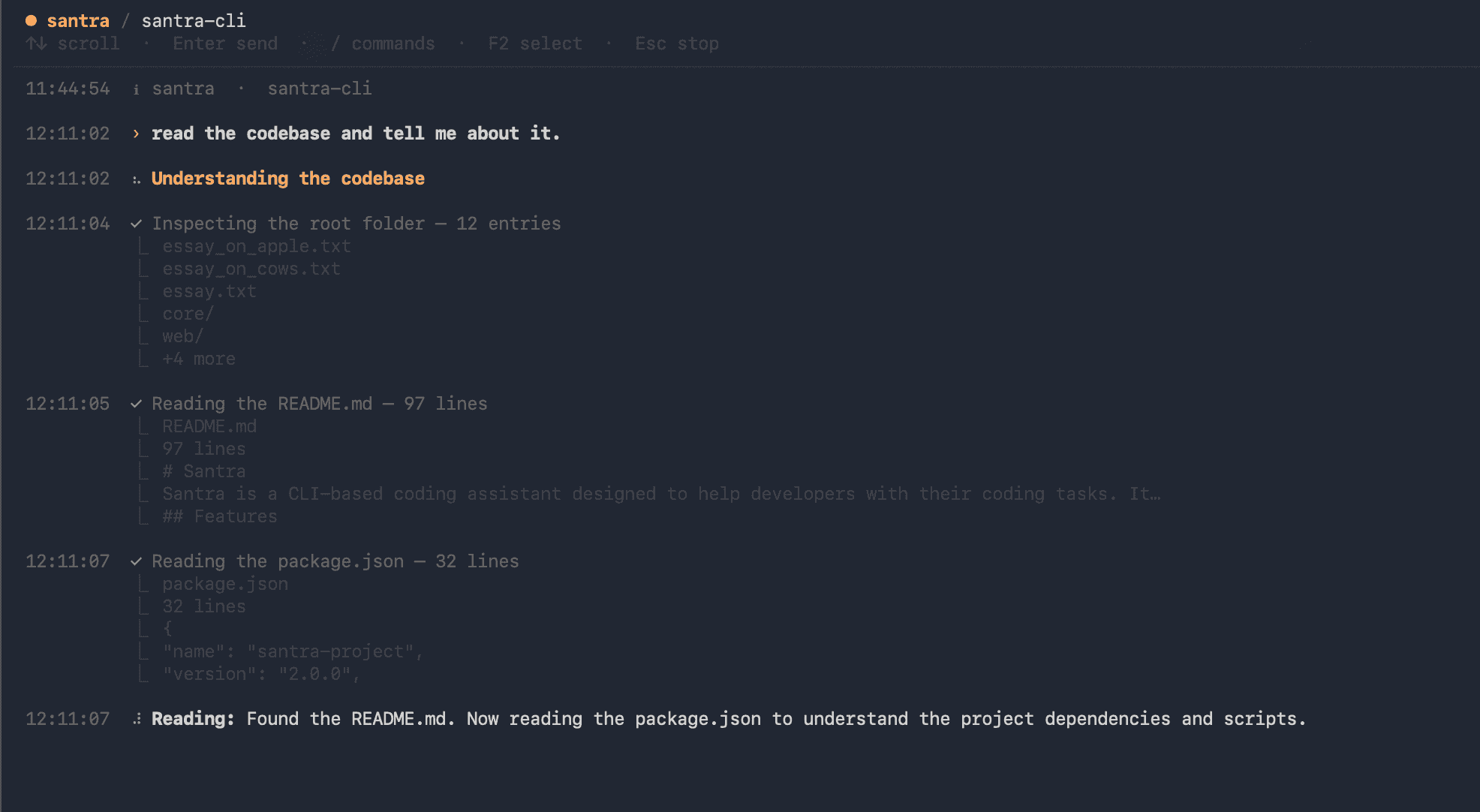
An open-source, repository-aware AI coding agent built as a Bun monorepo — it reads your codebase, reasons about its architecture, and makes precise edits using any AI provider, with a multi-agent Swarm, 23 built-in tools, and a diff-approval workflow so you stay in control.
Product
Santra
Role
Creator & Co-Maintainer
Timeline
2025 – Present
Version
v2.0.3
By the numbers
23
Built-in tools
5
Specialized agents
v2.0.3
Current stable version
Any
AI provider support
Quick Start
Up and running in one command
Install once as a global package, run from any project directory. Santra indexes your repo automatically on first launch.
The Problem
AI coding tools that don't understand your codebase
Most AI coding assistants are chat windows bolted onto an editor. They don't read your directory tree, don't understand your architecture, and have no way to execute code, run tests, or apply changes atomically. You end up copy-pasting between the assistant and your terminal, manually applying diffs, and losing context every session.
No real codebase awareness
Chat-based assistants rely on what you paste in. They can't index your repo, trace dependencies between files, or reason about architecture without you doing all that work manually.
Model lock-in
Most tools are tightly coupled to one provider — Anthropic or OpenAI — making it impossible to switch to a local Ollama model for private code or a faster Groq endpoint for routine edits.
No change control
When an AI writes a file, you either trust it blindly or review a wall of text. There's no structured diff preview, no line count, no approve-or-reject workflow before changes land on disk.
Context dies between sessions
Every new conversation starts from zero. There's no way to pick up a refactor thread from yesterday, resume mid-task, or hand off context to a specialized sub-agent.
The Solution
A terminal-native agent that reads, edits, and ships code.
Santra runs in your terminal, indexes your repository before each task, and routes work through a multi-agent Swarm — each specialist does one thing well. Every proposed file change shows a diff with line counts before anything is written. Sessions persist so you can /resume yesterday's work. And because model selection is fully decoupled, you pick the provider that fits the task.
Repository Indexing
Before touching a file, Santra walks your directory tree, reads relevant source files, and builds a mental model of your architecture. It understands which files are entry points, which are utilities, and how they relate — without you explaining it.
Multi-Agent Swarm
Complex tasks are handled by a Swarm of five specialized agents: file-picker finds the right files, reader synthesizes context, executor implements changes, reviewer critiques the output, and thinker reasons through hard decisions. The orchestrator routes work between them automatically.
Zero-Latency Prompt Classifier
Every prompt is classified synchronously before routing — simple_chat, direct_answer, or agent_task — with no LLM call. This means greetings get a quick reply, knowledge questions skip the heavy pipeline, and coding tasks go straight to the Swarm.
Diff Approval Workflow
Before any file is modified, Santra displays a unified diff with added/removed line counts and waits for your approval. You can keep the change, revert it, or give feedback inline — nothing hits disk without your sign-off.
Persistent Sessions
Conversations auto-save. Use /resume to reopen any past session with full message history, tool calls, and agent context intact. Long refactors survive restarts.
Provider-Agnostic AI
Santra routes directly to any AI provider's API — Anthropic, OpenAI, Ollama, Groq, Nvidia NIM, and more — with no markup or proxying. Switch models per task or run entirely locally for private codebases.
Agent Architecture
Multi-Agent Swarm — how it works
Every coding task routes through an orchestrator that decomposes work and dispatches it to specialist agents. Each agent has a narrowly-scoped system prompt and a defined input/output contract. Before any agent is spawned, a zero-latency prompt classifier routes simple queries to a lightweight path and reserves the Swarm for real coding tasks.
file-pickerLocates relevant files
Walks the repo tree and selects only the files relevant to the current task — no irrelevant context pollution.
readerSynthesizes codebase context
Reads selected files, traces import graphs, and builds a coherent understanding of architecture before any edits happen.
executorImplements changes
Makes precise, targeted file edits and generates a unified diff with line counts before anything is written to disk.
reviewerCritiques the output
Reads the proposed change, checks it against the original intent, and flags regressions or unresolved issues.
thinkerReasons through hard decisions
Activated for ambiguous tasks — architectural choices, trade-off analysis, or when executor and reviewer disagree.
Built-In Tooling
23+ tools across 6 categories
Agents can invoke built-in tools covering everything from file operations and shell execution to web search and sub-agent orchestration. Every tool is defined with a Zod schema, validated at call time, and returns structured results.
File Operations
Read, write, edit, delete, move, and search files across the entire repository tree.
Shell Execution
Run arbitrary shell commands with configurable timeouts, working directory control, and structured stdout/stderr capture.
Web & Search
Search the web and fetch page content mid-task — for library docs, API references, or research.
Agent Orchestration
Spawn sub-agents, delegate decomposed tasks, wait for results, and merge outputs back into the main context.
Git Integration
Read git status, diff, log, and branch state without leaving the agent context — used by reviewer and thinker.
Context & Session
Save and restore full conversation state across sessions — message history, tool calls, and agent phases — via /resume.
Technology Stack
Built with the right tools
 TypeScriptLanguage
 Node.jsRuntime
 BunRuntime & Build Tool
 ReactTUI Framework
 InkTerminal UI Library
 Next.jsDocs Site
 Tailwind CSSStyling
 ZodValidation
 ESLintLinting
 GitVersion Control
 Bash / ZshShell Execution
 VercelDeployment
Architecture
Monorepo (Bun workspaces)
santra-cli/
├── cli/                    # Published npm package (santra)
│   ├── src/tui_v5/         # Terminal UI (React + ink)
│   └── bin/santra.js       # CLI entrypoint
├── core/                   # Routing & session layer
│   ├── src/runner.ts       # Runner class
│   └── src/classifier.ts   # Zero-latency prompt classifier
├── packages/
│   ├── agent-runtime/      # Swarm, BaseAgent, tool execution
│   └── shared/             # Zod types, schemas, constants
├── agents/                 # Built-in specialist agents
│   ├── file-picker.ts
│   ├── reader.ts
│   ├── executor.ts
│   ├── reviewer.ts
│   └── thinker.ts
└── web/                    # Docs site (santra-cli.vishalvoid.com)
Development Journey
How it was built
Phase 01
The problem was personal
The frustration that sparked Santra was specific: existing AI coding tools were great for snippets but useless for tasks that spanned multiple files, required running a build, or needed context from last week's session. The goal was an agent that could actually live inside a development workflow — not sit beside it.
Phase 02
Designing the monorepo architecture
The tool was designed as a Bun monorepo from day one, split into four packages: `@santra/shared` (types and schemas), `@santra/agent-runtime` (Swarm, BaseAgent, tools), `@santra/core` (routing and session), and `cli` (the published npm package with the TUI). This separation meant the TUI, the agent runtime, and the web docs could all evolve independently without coupling.
Phase 03
Building the Swarm and agent runtime
The multi-agent Swarm was the hardest piece. Each agent needed a focused system prompt, a defined scope, and a clean handoff protocol. The orchestrator had to decompose tasks, spawn the right specialist, and merge results without hallucinating intermediate state. The agent-runtime package handles SSE streaming, tool call parsing, error recovery, and continuation messages when a run fails mid-way.
Phase 04
The classifier: zero-latency routing
Adding a synchronous, dependency-free prompt classifier was a late insight. Before it, every message went through the full Swarm pipeline — expensive for 'hi' or 'what is a closure?'. The classifier categorises prompts in microseconds using regex rules and word-count heuristics, routing simple messages to a lightweight BaseAgent and reserving the Swarm for real coding tasks.
Phase 05
TUI iterations and the docs site
The terminal UI went through five versions (v3 → v5) as the interaction model evolved — from a simple scrolling log to a live transcript view with structured agent phase events (status, thinking, tool_call, tool_result). The Next.js + Tailwind docs site at santra-cli.vishalvoid.com was built in parallel to document the tool as it shipped.
Engineering Challenges
Hard problems, real solutions
Error recovery mid-swarm
Problem
When a sub-agent fails or a tool call errors mid-task, simply surfacing the error loses all context from the partial run — tool call history, status phases, and intermediate outputs.
Solution
Implemented a continuation message that is appended as an assistant turn: it includes the original prompt, the last three status phases, and the last six tool results. Subsequent runs have full context to resume cleanly without starting over.
Classifier precision vs. safety
Problem
A false positive in the classifier (sending a coding task through direct_answer) silently fails — the model answers without tools. A false negative (sending a greeting through the Swarm) just wastes a round-trip.
Solution
Biased the classifier hard towards agent_task. All prompts ≥300 characters default to agent_task as a safety net. Only prompts that explicitly match simple_chat or direct_answer patterns (with multiple positive signals) get the lighter path.
Provider-agnostic streaming without abstraction bloat
Problem
Supporting multiple AI providers — each with slightly different SSE formats, API shapes, and error codes — without writing a full provider-abstraction layer that becomes its own maintenance burden.
Solution
Kept provider routing lean: the endpoint and API key are passed through directly, with thin normalisation only for the delta and tool-call parsing that Santra actually uses. No fake unified SDK — just the minimum surface needed.
Quality & Testing
Classifier unit tests + integration-level agent runs.
Core test coverage focuses on the prompt classifier (pure function, easy to test exhaustively) and end-to-end agent runs against real tool implementations. The classifier has a full suite covering every classification path and boundary case.
| Method | Endpoint / Function | Tests | Passing |
|---|---|---|---|
| FN | classifyPrompt (simple_chat) | 8 | 8 |
| FN | classifyPrompt (direct_answer) | 6 | 6 |
| FN | classifyPrompt (agent_task) | 12 | 12 |
| FN | tool parser (agent-runtime) | 10 | 10 |
| FN | local runner (agent-runtime) | 8 | 8 |
Project Roadmap
What's done, what's next
v2.0.3 · Stable
Upcoming · In Progress
Future · Planned
Technical Whitepaper
The complete architecture deep-dive
The whitepaper covers architecture decisions, agent protocols, tool design, session persistence internals, and implementation details that don't surface in the docs — written as a reference for contributors and developers integrating with the runtime.
PDF not rendering? Use the buttons above to open in a new tab or download directly.