Solving “SwaggerUIBundle is not defined” Error in Express with Swagger.
Let me walk through how to solve the common “ Uncaught ReferenceError: SwaggerUIBundle is not defined at window.onload ” error that coours when setting up Swagger documentation in…
Vishal Kr. Singh
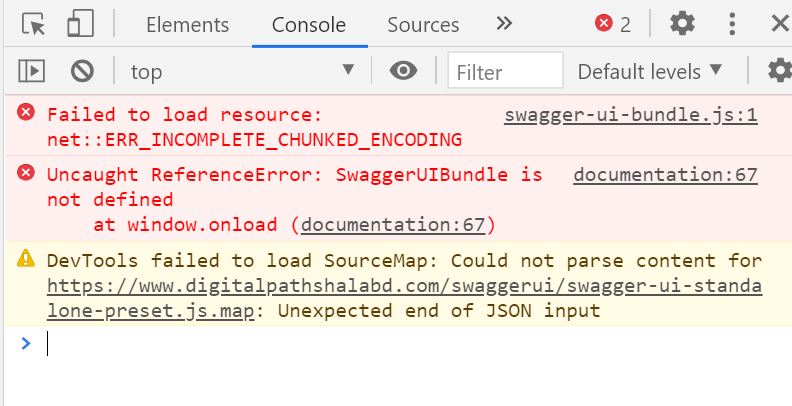
Let me walk through how to solve the common “Uncaught ReferenceError: SwaggerUIBundle is not defined at window.onload” error that coours when setting up Swagger documentation in an Express application, especially in a Turborepo Environment.
Understanding the Problem.
The main issue was that swagger-ui-express wasn’t properly serving the UI files, likely due to conflicts with the bundler (Webpack in this Turborepo setup). This resulted in a blank page with the error: “Uncaught ReferenceError: SwaggerUIBundle is not defined at window.onload”.
Solution Approach — Serve Swagger UI Locally
Instread of relying on “Swagger-ui-express”, I decided to :
- Download Swagger UI files directly to the project.
- Serve them as static files.
- Configure them to use our generated swagger specification.
Let me show you the implementation:
Step 1: Download Swagger UI Files
At first I will download the Swagger CSS, SwaggerUIBundle and other required files. for that :
Run the following commands in your project terminal to fetch the required Swagger UI files:
# Remove duplicate public folders if they exist
rm -rf /Users/vishal/Developer/PMS/PMS/apps/http/src/public

# Ensure the correct public folder exists
mkdir -p /Users/vishal/Developer/PMS/PMS/apps/http/public/swagger-ui

# Download Swagger UI files to the correct location
cd /Users/vishal/Developer/PMS/PMS/apps/http/public/swagger-ui

# Download required Swagger UI files
curl -O https://cdn.jsdelivr.net/npm/swagger-ui-dist/swagger-ui.css
curl -O https://cdn.jsdelivr.net/npm/swagger-ui-dist/swagger-ui-bundle.js
curl -O https://cdn.jsdelivr.net/npm/swagger-ui-dist/swagger-ui-standalone-preset.js
curl -O https://cdn.jsdelivr.net/npm/swagger-ui-dist/favicon-32x32.png
curl -O https://cdn.jsdelivr.net/npm/swagger-ui-dist/favicon-16x16.png
Step 2: Configure Express to Serve Swagger UI
Modify your index.ts file to serve Swagger UI from the local files instead of using swagger-ui-express.
index.ts
import dotenv from 'dotenv';
dotenv.config();

import express from 'express';
import cookieParser from 'cookie-parser';
import path from 'path';
import { router } from './routes/v1';
import { config } from './config/config';
import { setupSwagger } from './config/swagger';

const app = express();
app.use(express.json());
app.use(cookieParser());

// Serve static files from the public directory
app.use(express.static(path.join(__dirname, 'public')));

// Serve Swagger UI files
app.use('/swagger-ui', express.static(path.join(__dirname, '../public/swagger-ui')));

// Setup Swagger
setupSwagger(app);

// API routes
app.use('/api/v1', router);

app.listen(config.get('port'), () => {
  console.log(`Server is running on port ${config.get('port')}`);
  console.log(`Swagger documentation available at http://localhost:${config.get('port')}/api-docs`);
});
Step 3: Generate Swagger Documentation
Modify your swagger.ts file to generate and serve the Swagger JSON file.
swagger.ts
import { Express } from 'express';
import swaggerJsdoc from 'swagger-jsdoc';

const options = {
  definition: {
    openapi: '3.0.0',
    info: {
      title: 'PMS API Documentation',
      version: '1.0.0',
      description: 'Project Management System API Documentation',
    },
    servers: [
      {
        url: 'http://localhost:3000/api/v1',
      },
    ],
    components: {
      securitySchemes: {
        bearerAuth: {
          type: 'http',
          scheme: 'bearer',
          bearerFormat: 'JWT',
        },
      },
    },
    security: [
      {
        bearerAuth: [],
      },
    ],
  },
  apis: ['./src/routes/**/*.ts'],
};

const swaggerSpec = swaggerJsdoc(options);

export const setupSwagger = (app: Express) => {
  // Serve swagger.json
  app.get('/api-docs/swagger.json', (_, res) => {
    res.setHeader('Content-Type', 'application/json');
    res.send(swaggerSpec);
  });

  // Redirect /api-docs to the Swagger UI
  app.get('/api-docs', (_, res) => {
    res.redirect('/swagger-ui/');
  });
};
Step 4: Verify Your Swagger Documentation
- Start your Express server:
- npm start
2. Open your browser and visit:
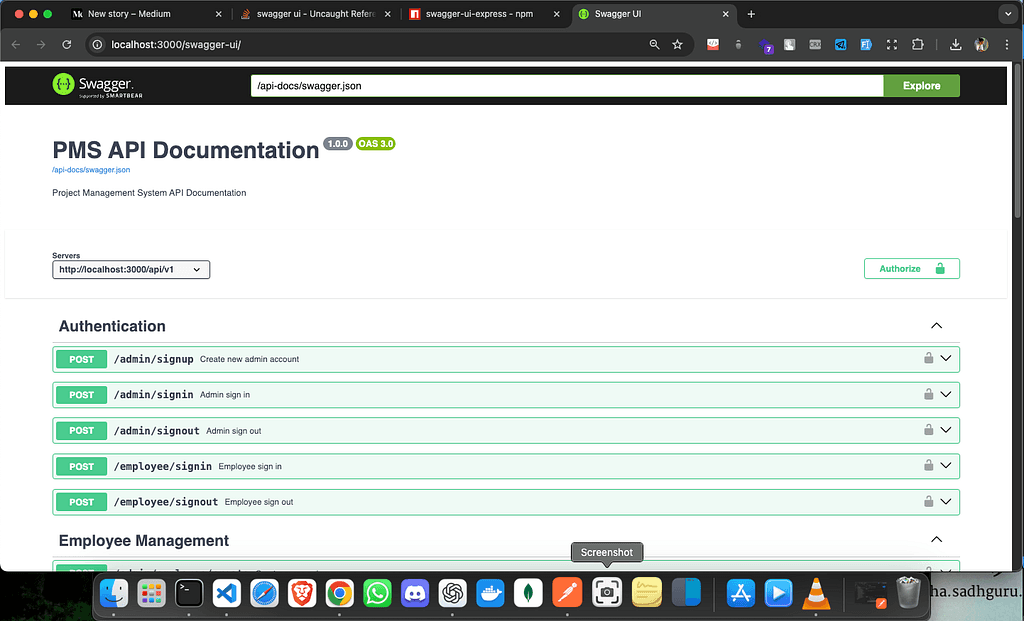
3. This should redirect you to http://localhost:3000/swagger-ui/, where your API documentation will be displayed.
also running the previous commands should should generate a swagger-output.json file in the root project directory.
Important : for proper generation of swagger-documentation openapi-spec for every route is must.
2. Serve them as static files
3. Configure them to use our generated swagger specification